• Nederlands

Solution

Microsoft Copilot implementation

Twentynext guides the introduction of Microsoft Copilot in Office 365, Teams and Dynamics, from first setup to daily use. The first step is rarely the tool itself: who can see what has to be right first.

Schedule an introduction →
Desk by the window with a laptop and an assistant panel

What it is

What is Microsoft Copilot?

Copilot is Microsoft’s AI assistant that works inside the programs your people already use: summarising and drafting in Word and Outlook, meeting notes in Teams, analysis in Excel, insight in Dynamics. It is not a separate system, but a layer over your existing work environment.

Where it goes wrong

Permissions first, then the rollout

Copilot sees whatever the logged-in user is allowed to see. If permissions and data classification are not in order, that can show at the very first question: someone surfaces documents they could formally access but were never meant to read. So an implementation with us starts with cleaning up permissions and classification: then the rollout.

Our role

Our role in the implementation

Licences you buy from Microsoft. We do what is needed around them:

  • Setup: connecting Copilot to your existing Microsoft environment, with permissions and data classification as the first step.
  • Configuration and training: which scenarios first, and who starts working with it first.
  • Follow-through: what it takes to keep usage up once the novelty wears off.

That is what AI consultancy looks like with us: advice we then carry out ourselves.

In practice

What Copilot does in day-to-day work

Routine work

Standard reports, data entry and summarising email can largely be taken over: how much exactly depends on licence and setup. Where the freed-up time goes is your organisation’s choice; it does not happen by itself.

Analysis in Excel and Dynamics

Scenario analysis in Excel, customer insight in Dynamics 365. The outcomes are only as good as the underlying data, which is why we look at that foundation first.

Meetings and documents

Meeting notes and action points in Teams, drafting in Word and Outlook, inside the tools your teams already use, with no extra system alongside.

What it delivers

The gain sits in hours that used to go to routine work. How much that is differs per role and per organisation: we are honest about that up front.

Customer contact

Summaries of customer communication and prepared replies. The tone and the judgement stay with your employee.

Limits

Copilot can give wrong or incomplete answers. People working with it need to know that and be able to check: that belongs in the training, not in the small print.

Security and compliance

Copilot runs inside your Microsoft environment and follows the permissions set there. Microsoft states that your business data is not used to train models; the permissions themselves remain your responsibility, and we put those right during implementation.

New employees

Questions about processes and documents get an immediate answer, provided the underlying documentation is in order. If it is not, that is the first step.

Consistency

Documents and reports follow the same structure, whoever produces them. Answers are never word-for-word identical, it remains generative AI, but form and structure become more predictable.
Ready to start with Copilot?

Want to know what needs sorting out in your environment first? Get in touch: we respond within one business day.
Schedule an introduction

Frequently asked questions

Which consultancy has experience with Microsoft Copilot implementation?

Twentynext implements Microsoft 365 Copilot and Copilot Studio for organisations across the Netherlands, with the focus on the data underneath: permissions, sources and management. We are a data and AI company, not a licence reseller; the implementation starts with the question which documents Copilot is allowed to see. The same people do our data and AI projects and guide the rollout from first setup to daily use: integration into the existing Microsoft environment, configuration, and training of the people who work with it.

How do companies integrate Copilot into their daily workflows?

In three steps: first pick the ten tasks where staff lose time today, then test per task whether Copilot gives a usable answer with the existing data, and only then roll out per department with an owner per task.

What does a Copilot implementation cost?

The licence is known; the work is on the data side. An implementation for 50 to 200 employees takes us six to twelve weeks, including permission clean-up and a management agreement. These are guidelines from our projects, not a guarantee: every situation calls for tailored work, and we set amounts and lead times per organisation.

What exactly does Microsoft Copilot do?

Copilot is an AI assistant that works inside the Microsoft products you already use: summarising and drafting in Word and Outlook, meeting notes and action points in Teams, analysis in Excel, insights in Dynamics. It is not a separate system, but a layer over your existing working environment.

What needs to be in place before Copilot is usable?

Copilot sees what the user is allowed to see. If permissions and data classification are not in order, that becomes visible at the first question: Copilot surfaces documents to someone who is formally allowed to read them but in practice should not. Cleaning up permissions is therefore the first step, not the last.

Does Twentynext also supply the licences?

Licences you buy from Microsoft. We do the implementation, the configuration and the support afterwards: which scenarios first, who starts working with it first, and what it takes to sustain use once the novelty wears off.

Continue reading
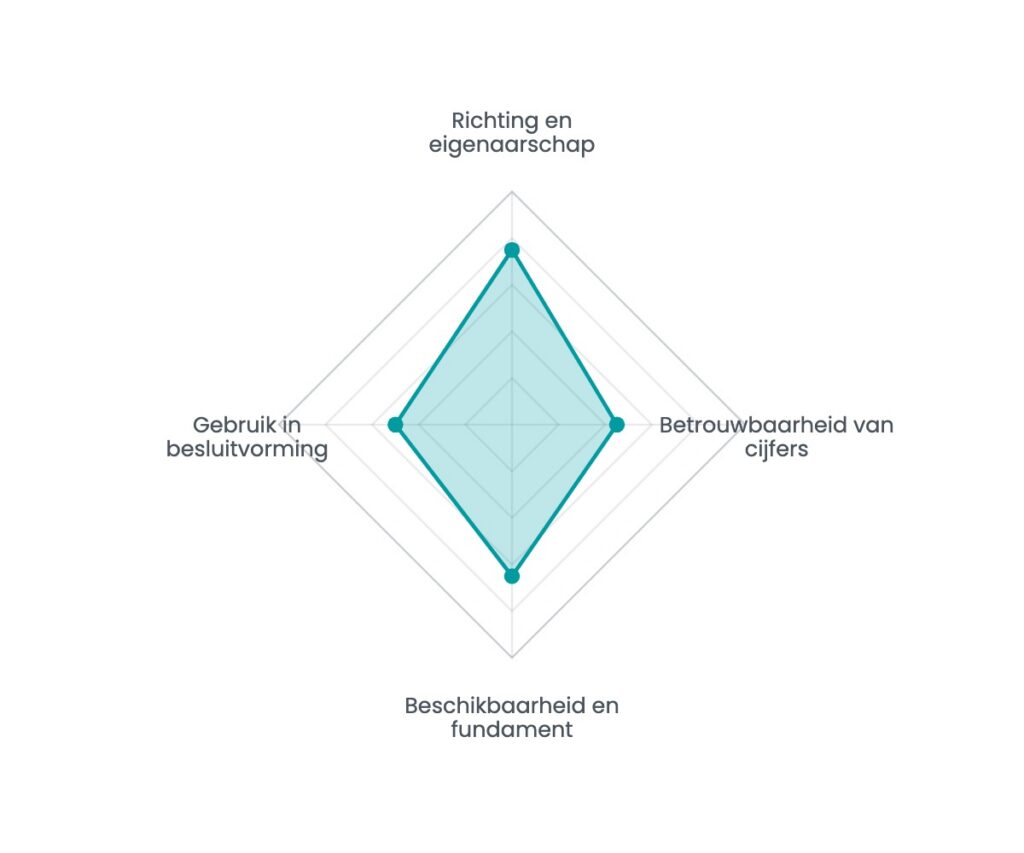
Example of a scan result: spider chart with four dimensions

Where does your organisation stand?

Sixteen questions, seven minutes, and an instant spider chart showing your strongest and weakest dimension. No e-mail address needed to see the result.

Work with us

Realise your project together?

The people who build it also run it afterwards. Eindhoven, since 2014.

Martijn van Grieken

Martijn van Grieken

Director Data & AI

Get in touch